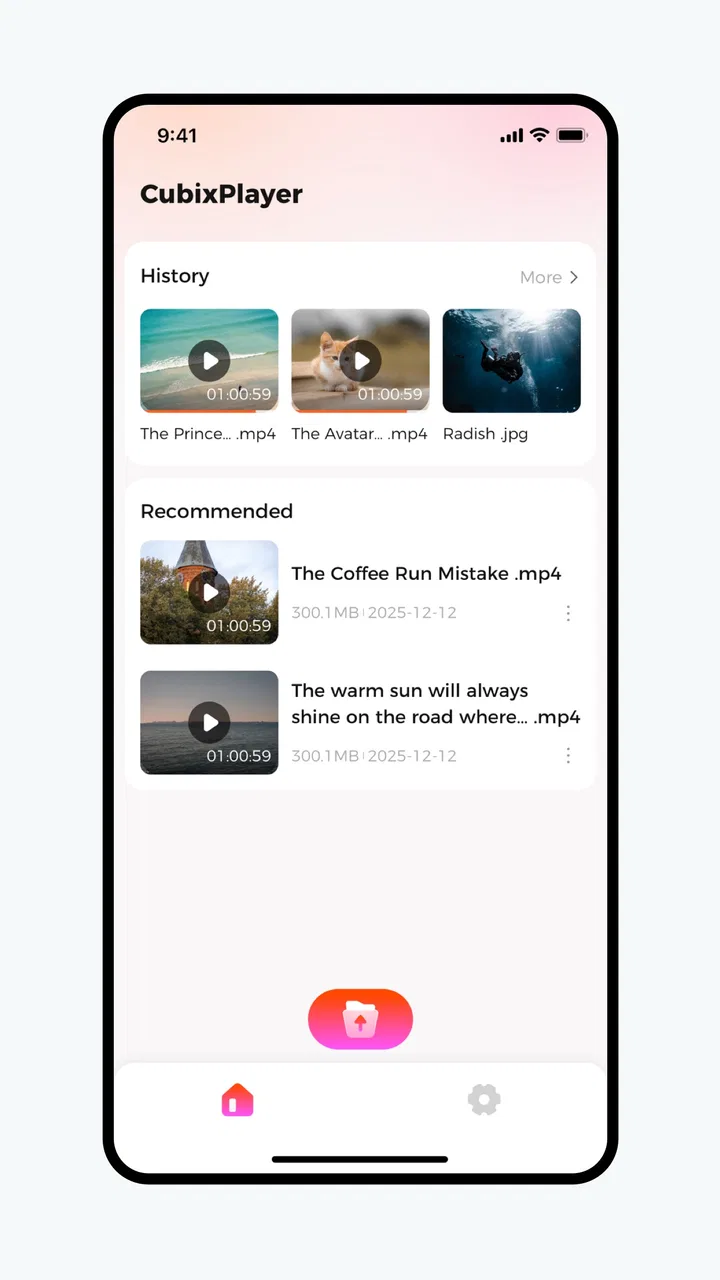
CubixPlayer
- 0.0
- Rating
- 100.00K
- Installs
- Free
- Price

 Analysis by App-foxy
I spent time with CubixPlayer as a straightforward video playback app, and my first impression was that it is trying to stay focused rather than become an all-purpose media toolbox. That narrow purpose is useful if you mainly want to open and watch videos on an Android device without being pushed toward editing, social sharing, or a complicated library. It is less convincing if you expect a mature media center with extensive organization, streaming integrations, or advanced playback controls.
The app comes from Fluxconverge and sits in the Video Players & Editors category, although its practical role is much closer to a player than an editor. It is free to install, rated for Everyone, and has passed the 100K-install mark. Those details make it easy to try without much commitment, but they do not automatically make it the right replacement for a player you already trust. My recommendation depends on how much control you want over your viewing routine.
How CubixPlayer feels in everyday use
The best way to understand this app is to picture a normal, slightly messy day. I might receive a video in a chat, download a clip for a trip, or keep a recording on the phone that I want to check quickly. In that situation, a dedicated playback app is valuable because I do not want to edit the file or upload it anywhere. I want to open it, see whether the picture and sound behave properly, and move on. CubixPlayer makes sense for that kind of direct viewing.
You May Also Like

 Blood Strike: 2.5 Anniversary
Blood Strike’s Loadouts Turn Every Drop Into a Tactical Gamble
A close look at Blood Strike’s custom loadouts: how fast access to signature weapons reshapes its battle royale rhythm, rewards preparation, and narrows the gap between fights.

 Pandora - Music & Podcasts
Pandora’s Music Is Easy to Start, but Harder to Recover
Pandora’s strength is its low-effort path from a seed to a station. Its weak spot is how much confidence it asks you to place in connection, setup, and quiet recovery.

 8 Ball Pool
 Is Built on Rivalries, Rematches, and Routine
A close look at the rivalries, rematches, shared routines, and unanswered safety questions that turn a quick pool match into a persistent mobile community.

 Samsung Music
’s Quiet Strength Is Playing What You Already Own
Its reach comes less from spectacle than from dependable access to a personal library. That simplicity is both the app’s strongest retention engine and its ceiling.

 AccuWeather: Weather Radar
AccuWeather Review: A Quick, Clear Forecast for Everyday Decisions
For everyday plans, the best forecast is the one you can understand quickly. AccuWeather makes rain timing, radar, and local conditions easy to act on, with a few trade-offs.

 Hill Climb Racing
Why Hill Climb Racing Still Turns Crashes Into One More Run
A tiny car, a bumpy hill and one more upgrade: Hill Climb Racing keeps resurfacing because its simple chaos makes every near-miss feel personal.
More From Our News Desk
View All News


I also see a place for it on a secondary device. An older phone used for downloaded lessons, family recordings, or offline entertainment does not necessarily need a large media ecosystem. A focused player can be easier to understand for someone who only needs to select a video and watch it. The Everyone content rating also makes the app approachable for a broad household audience, although that rating should not be confused with a promise that every video opened inside it is suitable for every viewer.
What I like about this positioning is the lack of pressure to treat playback as a project. Many video apps surround a simple viewing task with feeds, recommendations, accounts, or editing panels. Those extras can be useful, but they also slow down the basic action. CubixPlayer is more appealing when the file is already on the device and the only job is to play it.
There is an important trade-off here. A simple player can feel clean because it has fewer decisions, but it can also leave experienced users wanting more. If you regularly adjust subtitle timing, manage network shares, cast to several kinds of devices, or maintain a carefully tagged library, you should compare the app with a more established media player before making it your default. CubixPlayer is easiest to recommend to people who value a direct route from video file to playback.
What the current release tells me
The current version is 3.0.0, which gives the app the feel of a product that has reached a notable stage rather than a tiny experiment. I would not treat a version number alone as proof of polish, but it does matter when deciding whether to test an app. A major-number release suggests that the developer, Fluxconverge, is presenting this build as a meaningful current version, not merely an incidental update.
The release date is April 21, 2026, so I would judge CubixPlayer as a current product rather than relying on impressions from older builds. That matters especially for video playback, where device software, file formats, and operating-system behavior can change over time. My practical advice is to test the exact files you care about during the first session. A player can be perfectly adequate for ordinary clips and still be a poor match for a particular camera format, downloaded course, or high-resolution recording.
The minimum operating-system requirement is Android 7.0. That gives the app a fairly broad potential reach, including devices that are no longer close to the newest Android generation. For someone keeping an older phone alive as a travel or household media device, this is a useful detail. It also means that your experience may depend heavily on the phone itself: an older handset can have less storage, weaker decoding performance, or a smaller screen even when the app installs successfully.
I would describe version 3.0.0 as a point to evaluate, not a reason to assume every missing convenience has been solved. The useful question is whether its current playback behavior fits your files and habits. Product evolution is encouraging, but the everyday test remains more important than the label attached to the release.
Small workflows that make the app more useful
My first practical tip is to use CubixPlayer as a file-checking step before committing to a larger workflow. If someone sends you a recording, open it in the player before importing it into an editor or backing it up. You can quickly confirm whether the file has usable sound, whether the orientation looks right, and whether the recording is complete. That saves time compared with discovering a problem after moving the file through several apps.
A second useful workflow is separating playback from editing. If you often work with clips, it is tempting to open every video in an editor just to preview it. That adds unnecessary steps and can make a quick review feel like a task. I would use CubixPlayer for the first pass, then send only the clips that need trimming or captions to an editing app. This division is especially sensible for people who keep a large folder of short recordings and need to inspect them one by one.
A third tip is to treat it as a controlled offline viewer. Before a flight, appointment, or commute, I would place the videos I actually intend to watch in one easy-to-find location, then test a few of them while still connected to the internet. The point is not that the app guarantees every file will work; the point is that a short pre-trip check exposes problems while you still have options. It also prevents the common mistake of discovering that a supposedly saved video is only a shortcut to an online source.
Another non-obvious use is comparing the same recording after a transfer. When a video moves from a computer, camera, or messaging app to a phone, playback can reveal whether the transfer preserved the file properly. If the picture stops unexpectedly or the sound is missing, I would first try the original file in another player before blaming the phone or the recording. CubixPlayer can therefore serve as one part of a simple troubleshooting routine, even if it is not the only tool involved.
For families, I would keep expectations practical. A parent or relative who wants to watch local recordings may appreciate a focused player more than an editing suite. However, I would still organize the files clearly and explain where they are stored. The app can open and play video, but good file naming and folder habits remain important when several people share one device.
Where it differs from familiar alternatives
Compared with a phone’s built-in gallery, CubixPlayer may be attractive when I want playback to feel like a dedicated activity rather than one feature inside a photo library. The gallery is often the fastest option for a newly recorded clip, especially when I am already browsing pictures. A separate player becomes more useful when videos come from several places and I want a consistent way to open them.
Compared with a feature-heavy media player, the appeal is the opposite. Established alternatives often provide a wider range of controls, broader format handling, network playback, subtitle tools, or library management. Those capabilities can justify the extra complexity for people with large collections or unusual files. If my priority were a home media server, detailed audio-track selection, or extensive subtitle adjustment, I would lean toward that kind of specialist instead of expecting CubixPlayer to cover every advanced case.
Compared with an editing app, the distinction is even clearer. Editors are designed for changing a video, not just watching it. They are the better choice when I need to cut a section, add text, correct timing, or prepare a file for publishing. CubixPlayer is better suited to the moment before that work: deciding whether the clip is worth editing at all.
Streaming services are also a different category of alternative. They are built around finding content online, while a local playback app is most useful when I already possess the video. If your viewing life is mainly subscriptions and online catalogs, CubixPlayer may not add much. If you have personal recordings, downloaded material, or files received from other people, the distinction becomes more relevant.
Costs, expectations, and day-to-day friction
CubixPlayer is free to install, which lowers the barrier to testing it with your own files. The app also includes in-app purchases ranging from $3.99 to $29.99 per item. I would not pay for an upgrade simply because the app is convenient for one short viewing session. I would first establish a repeated need: perhaps it becomes my regular player, solves a specific annoyance, or provides a capability that I use often enough to justify spending money.
That pricing range also means users should pay attention to what an optional purchase actually changes before confirming it. I would look for a clear explanation inside the purchase screen and consider whether the free experience already handles my normal videos. A free starting point is helpful, but the value of an in-app purchase depends entirely on the features attached to it and how often I would use them.
The main friction is not necessarily a visible failure; it is the uncertainty that comes with a focused app whose usefulness depends on personal files. A player can seem excellent until I hand it an unusual recording. That is why I would test several representative videos rather than one easy clip. Try a short phone recording, a longer file, a video with the audio arrangement you normally encounter, and anything important for work or study. This gives a much more honest result than judging the app from its first launch.
Storage habits matter too. If your phone is crowded, playback problems may be caused by the device rather than the player. I would leave enough free space for the operating system to work comfortably and avoid judging performance while several demanding apps are running. On an older Android phone, keeping expectations realistic is part of getting a fair assessment of version 3.0.0.
Who should use it, and who should skip it
I would recommend CubixPlayer to someone who wants a dedicated way to watch local videos, prefers a relatively uncomplicated starting point, and is willing to test the files that matter. It is also worth considering for an older compatible Android phone used as an offline screen, for a family member who does not need editing tools, or for anyone who wants to preview clips before sending them into a more elaborate workflow.
I would be more cautious if your collection depends on advanced media management. People who maintain network libraries, require specialized subtitle controls, rely on casting, or switch between many audio and video formats should compare it carefully with a mature alternative. The same applies to creators who need trimming, color adjustments, captions, or export settings. A playback app can complement those tools, but it should not be mistaken for an editor just because it appears in a category that includes both.
I would also skip it as a primary choice if nearly all your viewing happens inside streaming platforms. In that case, the service’s own app is usually the natural place to watch. CubixPlayer becomes relevant when your videos exist as files outside those services. That distinction is simple, but it prevents a lot of disappointment: this is a tool for handling video playback, not a replacement for every way people consume video.
What I would watch as the product develops
For future updates, I would pay attention to how Fluxconverge handles compatibility and the everyday details around playback. The most valuable progress would be the kind users notice only after living with the app: dependable opening of varied files, sensible resume behavior, clear handling of audio and subtitles, and a smooth route from a file manager into playback. Those are the areas that determine whether a player becomes a habit.
I would also watch how the paid options fit into the free experience. A good upgrade path should make the reason to pay understandable without making basic playback feel unnecessarily restricted. Since the app is free to try, users have a straightforward way to decide whether any optional purchase is worthwhile: use it with real files, repeat the tasks that matter, and only then consider spending money.
The current release gives CubixPlayer a reasonable opportunity to earn a place on an Android phone, particularly for local video playback and simple checking workflows. I like its focused identity, and I appreciate that it can serve people who do not want a full media-management system. At the same time, I would not replace a proven advanced player or editor without testing my own collection first.
My final view is that CubixPlayer is best approached as a practical, focused video player rather than an all-in-one media solution. It can be a useful everyday companion when the job is simply to open and watch a file, especially on a compatible older device or in an offline routine. Try it with the videos you genuinely use, keep your expectations centered on playback, and choose a more specialized alternative if your needs extend into serious editing, streaming, or library management.
FAQs for CubixPlayer
01What is CubixPlayer and what can I use it for?
CubixPlayer is a media player designed for enjoying video and audio content on a compatible device. Its main purpose is to provide a convenient way to open, organize, and play locally stored media files, depending on the version and platform you install. Before downloading, check the app listing carefully to confirm which formats, features, and operating systems are supported.
02Is CubixPlayer free to download and use?
The availability and pricing of CubixPlayer may vary between Android and iOS, as well as by region and app-store listing. Some versions may be free, while others can include advertising, optional purchases, or premium features. I recommend reviewing the official store page before installation so you can verify the current price, subscription conditions, and whether any extra payments are required.
03Which audio and video formats does CubixPlayer support?
Format compatibility is one of the most important details to check before installing CubixPlayer. Support can depend on the app version, device hardware, operating-system restrictions, and whether the file uses a particular codec. Common formats may work without difficulty, but unusual or high-resolution files might not. Check the developer’s specifications and test a few files before relying on it as your main player.
04Does CubixPlayer require internet access to play media?
If you are playing files already saved on your phone or tablet, CubixPlayer may be usable without a continuous internet connection. However, internet access can still be necessary for downloading media, displaying advertisements, checking licenses, updating the application, or using online-related features. Permissions and behavior can differ by platform, so review the requested access during installation and avoid granting permissions that do not seem necessary.
05Is CubixPlayer safe to install on Android or iPhone?
The safest way to install CubixPlayer is through the official Google Play Store or Apple App Store rather than downloading an unofficial APK or modified package from an unknown website. Before installing, verify the developer name, recent update history, user reviews, privacy information, and requested permissions. Also keep your operating system updated, since app safety depends on both the application and the device environment.
Pros
- Supports multiple popular audio and video formats.
- Simple interface makes playback easy for new users.
- Offers playlist creation for organizing personal media.
- Provides background playback for supported audio content.
- Useful offline option for enjoying locally stored files.
Cons
- May lack advanced audio tools found in professional players.
- Compatibility can vary with unusual or newer media codecs.
- Some features may be limited without in-app purchases.
- Local file browsing may feel basic on larger libraries.
- Background playback can increase battery consumption.

CubixPlayer
Gallery